
Download Microsoft SQL Server 2005 Express Edition – SQL Server, database, Express Edition, free, lightweight, development, tool, utility, productivity, Microsoft
Overview
Microsoft SQL Server 2005 Express Edition is a lightweight, free database management tool designed for developers and small-scale application environments. It serves as an accessible entry point into Microsoft’s robust SQL Server ecosystem, offering core database functionalities without the complexity or cost of full-featured editions. The primary purpose of this software is to support rapid application development, prototyping, and deployment of small to medium-sized database-driven applications. It is particularly useful for developers working on local projects, embedded applications, or scenarios where a full database server is unnecessary.
Target users include independent developers, students, small business owners, and software teams building lightweight applications that require reliable data storage and retrieval. The tool is especially valuable in environments where budget constraints or deployment simplicity are key factors. By being free and redistributable, it enables developers to embed the database directly into their applications without licensing concerns.
Although the developer did not provide additional technical details about its historical context or evolution, Microsoft Corporation has a long-standing reputation in enterprise and developer tools. The software integrates with existing Microsoft server infrastructure, enhancing compatibility within broader development ecosystems. Real-world use cases include desktop applications, internal business tools, and small-scale web applications requiring a simple backend. In the broader app development landscape, SQL Server Express Edition continues to serve as a foundational utility for those seeking a secure, stable, and cost-effective database solution.
Key Features & Functionality
- Cost-Free Deployment: SQL Server 2005 Express Edition is available at no cost, allowing developers and organizations to use, distribute, and embed the database engine without licensing fees. This makes it ideal for open-source projects, educational tools, and commercial applications with limited budgets.
- Seamless Integration: Designed to work harmoniously with existing Microsoft server products, this edition supports smooth integration into Windows-based development environments. It enables developers to connect with Visual Studio, ASP.NET, and other Microsoft technologies, streamlining the development workflow.
- Rapid Prototyping: The lightweight nature of the software allows developers to quickly set up and test database schemas, queries, and application logic. This accelerates the development cycle, especially during early-stage project phases where speed and flexibility are critical.
- Data Protection Features: The edition includes essential mechanisms for data integrity, secure storage, and reliable retrieval. These features help safeguard application data against corruption and unauthorized access, ensuring consistent performance in production environments.
- Performance Optimization: While tailored for smaller workloads, the database engine delivers efficient performance for light web applications and local data stores. It handles concurrent connections and query execution with minimal overhead, making it suitable for low-to-moderate traffic scenarios.
For example, a developer building a small inventory management system can use SQL Server Express to store product data, track stock levels, and generate reports—all without the need for a full server setup. Similarly, a student learning database design can use the tool to practice writing SQL queries and managing relational data in a real-world environment.
Interface, UX & Performance
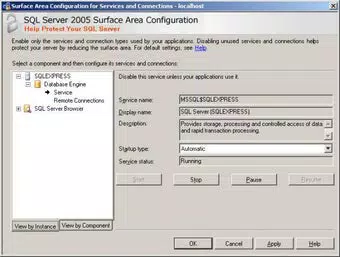
Microsoft SQL Server 2005 Express Edition provides a functional interface focused on core database administration tasks. The user experience is designed for developers and technical users rather than general consumers, with a command-line and graphical management tool (SQL Server Management Studio Express) included in the package. Navigation is structured around database objects such as tables, views, stored procedures, and users, offering a clear hierarchy for managing data.
The visual style is minimalistic and consistent with older Microsoft Windows applications, reflecting its release era. While modern UI standards are not fully met, the interface remains intuitive for users familiar with database management systems. Task execution, such as creating databases or running queries, is accessible through both the graphical tool and T-SQL scripting, supporting multiple user preferences.
Although the developer did not list formal performance metrics, the lightweight architecture suggests stable operation on mid-range Windows systems. It is expected to perform reliably on devices with sufficient RAM and disk space, particularly those used for development or testing. Responsiveness during query execution and database management tasks appears consistent with its intended use case. Stability is maintained across typical development workflows, though users should be aware that this version is no longer supported by Microsoft.
Platform Compatibility & Technical Requirements
Microsoft SQL Server 2005 Express Edition is designed exclusively for the Windows platform. It requires a compatible Windows operating system, though specific minimum requirements were not listed by the developer. The software has a file size of 132.6 MB, which is relatively compact for a database engine, reflecting its lightweight nature.
Version 9.00.1399.06 was released on November 7, 2005, marking its place in the early 2000s development landscape. As a legacy product, it is not compatible with modern Windows versions such as Windows 11 or Windows Server 2022 without potential compatibility layers or virtualization. Users should verify system compatibility before installation.
The developer did not specify minimum OS requirements, so installation on newer systems may require testing or the use of compatibility modes. For optimal results, it is recommended to run the software on a virtual machine or older Windows environment.
Pros and Cons
Pros
- Completely free to use and redistribute, reducing development costs.
- Lightweight and efficient, suitable for small-scale applications and local development.
- Seamless integration with Microsoft’s development ecosystem, including Visual Studio and .NET.
- Provides essential database features such as data integrity, security, and query optimization.
- Supports rapid prototyping and testing, accelerating the development lifecycle.
Cons
- Not supported by Microsoft as of 2016; security updates and patches are no longer available.
- Compatibility with modern Windows versions may be limited or require workarounds.
- Limited scalability compared to newer SQL Server editions.
- Outdated interface and lack of modern UI/UX standards.
- File size, while small, may still be excessive for very constrained environments.
FAQ
Is Microsoft SQL Server 2005 Express Edition still safe to use?
Due to the end of support by Microsoft in 2016, the software no longer receives security updates or patches. It is not recommended for production environments where data security is critical.
Can I install this on Windows 10 or Windows 11?
Installation on newer Windows versions is possible in some cases, but compatibility is not guaranteed. Users may need to use compatibility mode or run the software in a virtual machine.
Is SQL Server 2005 Express Edition free to download?
Yes, the software is available at no cost. It can be downloaded from Microsoft’s official archives for personal or development use.
Can I use this tool for my web application?
It can be used for small-scale web applications with low traffic. However, for larger or public-facing applications, a more recent and supported database solution is strongly advised.
What are the alternatives to SQL Server 2005 Express?
Modern alternatives include SQL Server Express (2019 or later), MySQL, PostgreSQL, SQLite, or cloud-based databases like Azure SQL Database. These options offer better security, performance, and ongoing support.
Final Thoughts
Microsoft SQL Server 2005 Express Edition remains a historically significant tool for developers who value accessibility, simplicity, and cost-free deployment. While its age and lack of support present notable limitations, it continues to serve niche purposes in legacy environments, educational settings, and isolated development workflows. For developers working with older systems or learning database fundamentals, it offers a reliable foundation for understanding relational data management.
However, users should be aware of the risks associated with using outdated software, particularly in terms of security and compatibility. For new projects, exploring modern database alternatives is strongly recommended. Nonetheless, for those who need a lightweight, free database engine for non-critical tasks, this edition still holds value.
Download Microsoft SQL Server 2005 Express Edition now


